In May 2024, Google dropped a bombshell on local businesses: the direct messaging feature on Google Business Profiles is officially gone.
As of July 31, 2024, that once-valuable tool that allowed you to chat directly with customers through your Google listing has been phased out.
For many, it felt like a setback—an important lead generation channel was removed, and businesses had to scramble for alternatives.
However, here’s the truth: the need for instant communication hasn’t disappeared. It’s simply shifted to new platforms. With the right approach, you can recover quickly, adapt strategically, and continue to build connections with customers in 2025.
This comprehensive guide will walk you through precisely what this change means for your business and provide you with a new, essential strategy to keep the conversation going.
What Disappeared—And Why It Matters for Your Business
The old GBP feature was a simple, in-profile chat function that allowed customers to send a message directly to your business from your Google listing. It appeared as a “Chat” button on Google Search and Maps, and messages were routed to the Google Business Profile app or dashboard.
The end of the feature came in two key phases:
- July 15, 2024: Google stopped allowing customers to start new chat conversations with businesses. Any attempt to start a new chat resulted in a notification that the feature was ending.
- July 31, 2024: The chat functionality was completely removed from your Google Business Profile. You could no longer receive new messages or view your chat history. Google recommended that businesses download their chat history via Google Takeout before the end of August 2024 to save all past conversations.
While Google did not provide extensive details on the reasons behind the change, it’s likely part of their ongoing efforts to streamline services and pivot towards new AI-driven features.
Why This Change Is a Big Deal for Local Businesses
The discontinuation of this chat feature means a direct line of communication, often used by high-intent customers, is now gone. Businesses that don’t adapt risk losing those valuable leads and seeing a drop in customer engagement.
However, this is not a permanent loss. It’s a call to action to create a more resilient, owned messaging strategy that isn’t dependent on a third-party platform.
Don’t Let Your GBP Go Silent: Use These Features Instead
Customer’s expectation for immediate engagement hasn’t disappeared; it has simply shifted. To keep your business competitive, you must provide new channels for real-time communication. Here are new strategies to keep the conversation alive.
Adding Alternative Messaging Links to Your Profile: WhatsApp and SMS
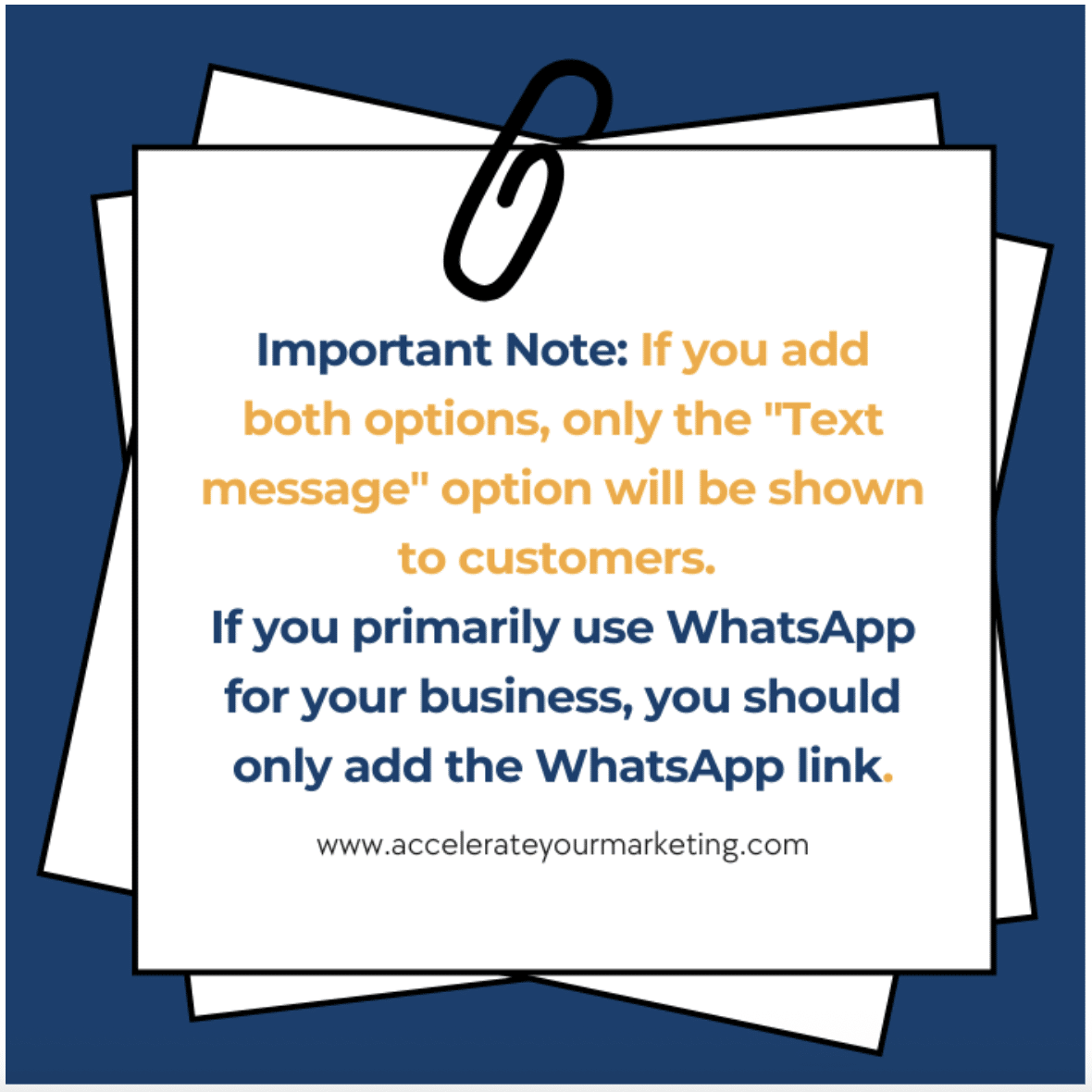
WhatsApp is one of the most popular messaging platforms worldwide. You can create a WhatsApp Business account for your company and use it as a communication channel with your customers.
If you wish to keep a more traditional route, you can also use an SMS option. Adding either of these alternatives to your GBP is easy:
1. Log in to your Google Business Profile: Go to your profile manager or search for your business name on Google.
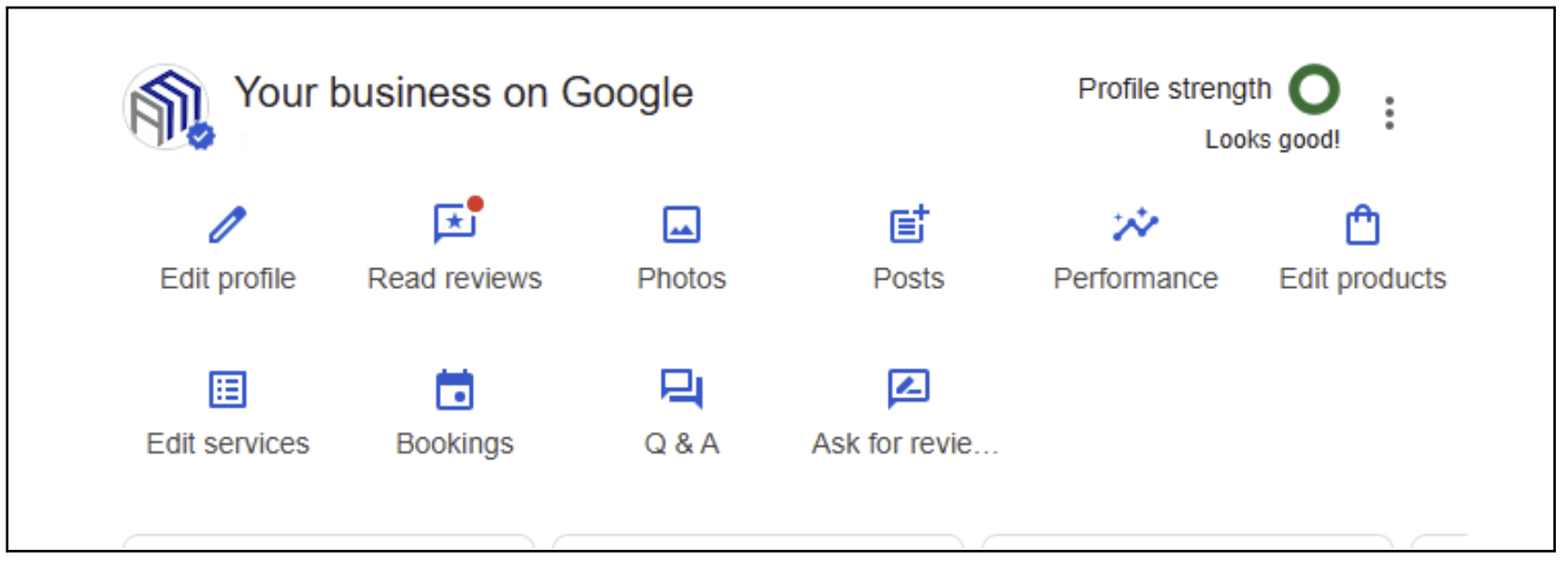
2. Navigate to Edit Profile: Click on “Edit profile,” then select the “Contact” tab.
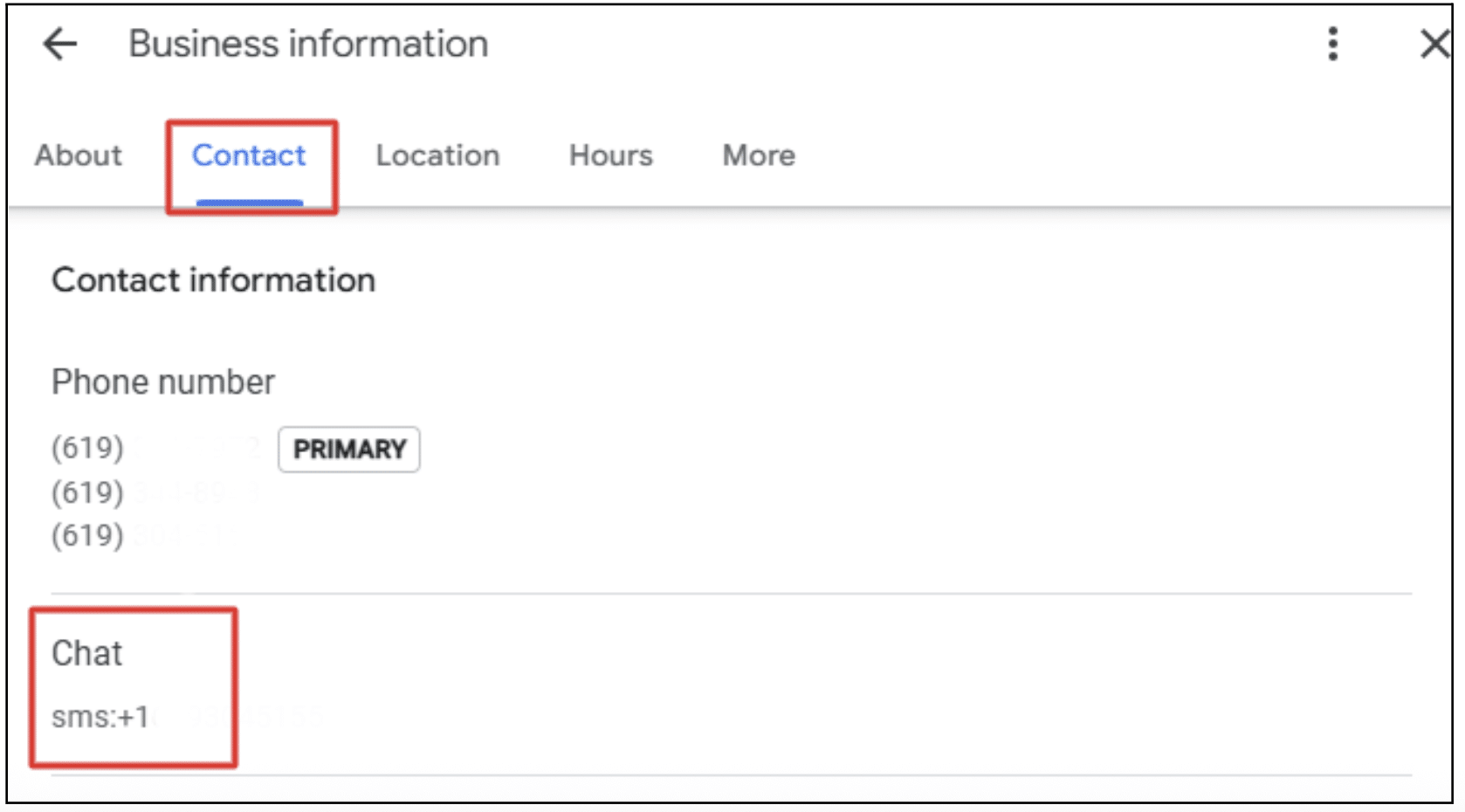
3. Find the Chat section: In the contact section, you should see an option for “Chat.” Click the down arrow to expand it.
4. Select your preferred channel: You can choose either WhatsApp or Text message.
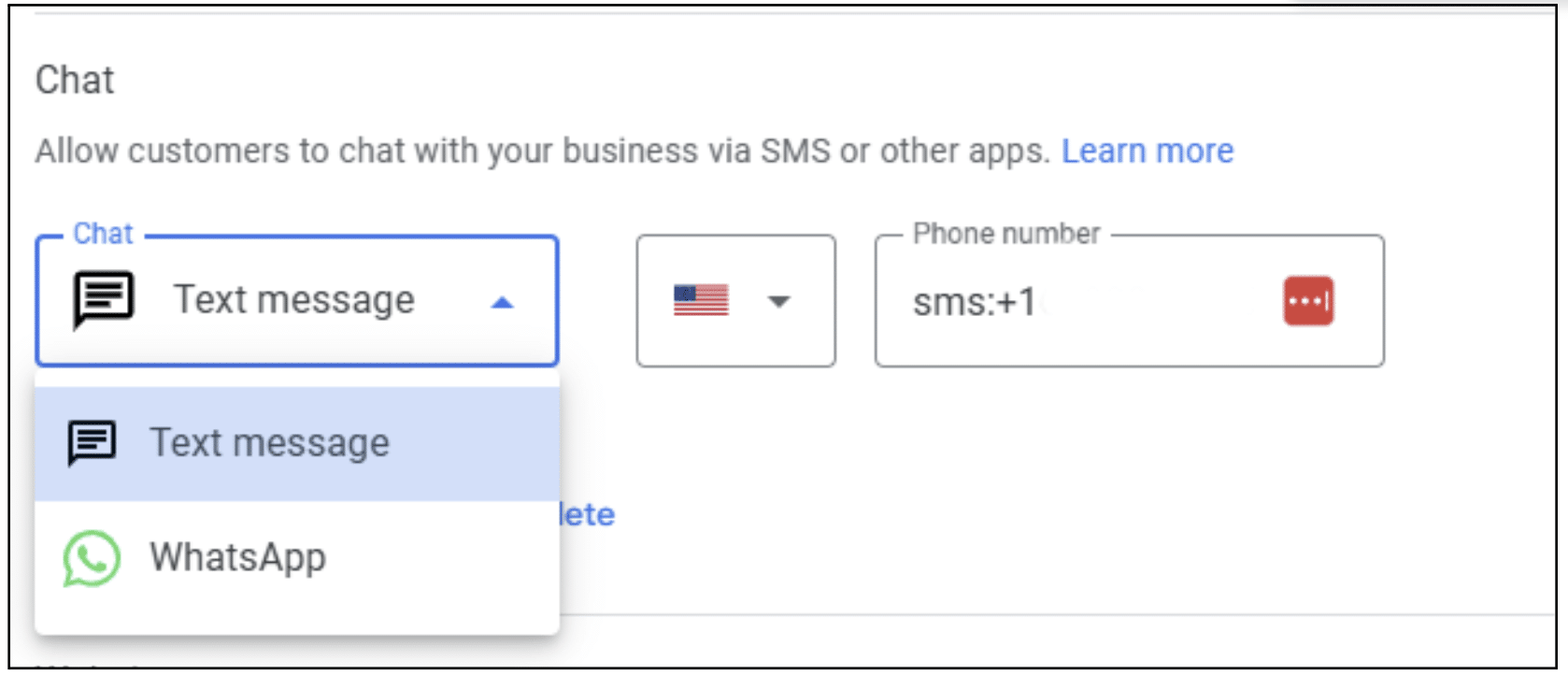
5. Enter your details:
- For WhatsApp, you will need to enter your WhatsApp Business phone number. Google will automatically generate a “click to chat” button for you.
- For text message, simply enter a phone number that can receive text messages.
- Save your changes.
The Power of Your Website Chat
The end of GBP messaging should remind us all of the power of owned platforms. Live chat on your website isn’t just an alternative—it’s the best solution.
Why a website chat solution is superior:
- Full Control & Data Ownership: You own the platform and all the data. You can integrate it with your CRM, analyze chat transcripts, and get a complete picture of your customer’s journey.
- 24/7 Automation: Many live chat solutions offer AI-powered chatbots that can handle common questions after hours, capture leads, and only escalate complex issues to a human agent.
- Consistent Branding: Your website chat can be fully customized to match your brand’s voice and design, creating a seamless and professional user experience.
- Increased Conversions: Live chat can proactively engage with visitors on your website, offering assistance and answering questions that may have prevented a sale.
Using Other GBP Features to Fill the Gap
Don’t let your Business Profile become a ghost town. With the chat feature gone, it’s more important than ever to use other features to engage customers proactively.
- Proactively Answer Questions: Post frequently asked questions in your GBP’s Q&A section, and provide clear answers. This not only helps customers instantly but also improves local SEO.
- Post Updates: Use Google Posts to link to your live chat or encourage direct contact on your website. Keeping your GBP fresh with new posts will boost SEO visibility and engagement.
Best Practices for a Post-Chat World
To successfully adapt to these changes and build a new messaging strategy that works, you need to implement a plan for your team and your technology. Follow these practices to ensure you make the most of your messaging channel.
✅ Be Proactive: Fill Your Profile with Useful Information
Start by populating your Google Profile with key details: frequently asked questions, business hours, service details, and answers to common queries. The more useful info you provide, the more likely it is to lead to an immediate conversion.
✅ Be Prepared: Have a Clear Plan for All Messaging Channels
With multiple messaging platforms now in play (website chat, WhatsApp, SMS), assign a team member to monitor and respond promptly.
Can’t keep up with all your messages and calls? Modern AI chatbots are more than simple scripted bots; they can understand intent, capture lead information, and provide quick responses—without overwhelming your team.
Accelerate Marketing’s Conversational AI is designed to seamlessly answer both phone calls and messages, ensuring every lead is captured promptly—even when you’re not around. It’s a smart way to scale your messaging capabilities and guarantee you never miss out on a potential customer.
✅ Be Consistent: Maintain the Same Brand Voice Across Platforms
Whether a customer is messaging you on your website, WhatsApp, or via SMS, make sure your tone is consistent across all channels. This ensures a seamless and professional experience for the customer, wherever they choose to reach out.
Frequently Asked Questions
Can I still download my chat history from the old feature?
The deadline to download these records was August 30, 2024. If you missed it, you will no longer be able to retrieve your chat history.
How can I make sure my team is ready for new messaging channels?
Create a clear response plan that includes who is responsible for monitoring each channel, what the expected response time is, and how to handle different types of inquiries. Providing templates for common questions can also help your team stay consistent and efficient.
How can I make sure my messaging strategy is effective?
Regularly monitor the performance of your messaging channels, including message volume, response times, and conversion rates. Use this data to refine your strategy, improve your responses, and ensure you’re meeting your customers’ needs.
What’s the best replacement for the old chat feature?
The best replacement is a combination of owned and external solutions. This includes a live chat on your website, a WhatsApp or SMS link on your GBP, and proactive use of your GBP Q&A section. The right choice depends on your business’s resources and your customers’ preferences.
How long should my response time be on these new messaging channels?
Customers have very high expectations for messaging. Industry benchmarks show that for live chat and messaging on your website, the average response time should be under 30 seconds. A delay of even a few seconds can significantly reduce the chances of converting a lead. While the ultimate goal is a fast, high-quality response, it’s crucial to acknowledge the customer immediately, even with an automated greeting, to show you’ve received their message and will get back to them. Ultimately, the faster you respond, the more valued the customer will feel.
Conclusion: The Conversation Isn’t Over—It’s Just Moving
The end of direct GBP messaging isn’t a setback; it’s a valuable opportunity to build a more resilient and effective messaging strategy. While a convenient tool is gone, the conversation with your customers is not.
By proactively adapting your strategy and moving the conversation to platforms you control, you can continue to meet customer expectations for instant engagement and ensure your business stays ahead of the competition.
Ready to build a new messaging strategy that drives results? We specialize in helping businesses adapt to changes like this by optimizing their online presence for real-world success. Discover our Google Business Profile solutions and get your new messaging strategy in place.