You expanded your Local Services Ads service map to cover a 50-mile radius, expecting a flood of new calls, but now the phone won’t ring. Rethinking how you configure your geographic settings in 2026 is necessary because your standard setup is likely holding back your campaign.
In the unified Google Ads ecosystem, service area settings are active algorithmic triggers, not passive boundaries. Optimizing your service area is a primary ranking factor: when a customer searches for help, Google prioritizes showing businesses whose defined service areas explicitly cover the searcher’s physical location.
Here is how Google evaluates your geography, and how to structure your service boundaries to capture maximum visibility in 2026.
How Service Areas Affect Your Proximity Score (The Visibility Driver)
If everyone in your market has great reviews and solid budgets, Google’s local ad platform relies on a key tie-breaker: your Proximity Score. It’s exactly what it sounds like: a real-time measure of how physically close your business is to the person typing the search.
When a user searches for your service, the platform officially bases its rankings on three core pillars: Distance, Relevance, and Prominence. Your review count and budget handle the “Prominence” part. But to calculate Distance and Relevance in milliseconds, the algorithm evaluates a strict three-way match:
- Your verified business location (The Anchor): Where your office actually sits on the map.
- The searcher’s physical location (The Target): Where the customer’s phone or computer is right now. The gap between this and your anchor dictates your exact distance.
- Your selected service areas (The Net): The specific ZIP codes or cities you told Google you actively cover. This determines your geographic relevance.
The Illusion of Expansion: Why Wide Service Areas Can Dilute Your Reach
Imagine you’re an electrician with a shop based in Pasadena. You set a broad 30-mile service radius because you want to land high-ticket residential jobs over in Santa Monica or Beverly Hills.
Even if you double your daily budget, the platform will favor a competing electrician whose physical shop is actually located in Santa Monica. Because that competitor’s physical location and the customer are in the same neighborhood, their distance is minimal, and their Proximity Score will win the auction almost every time.
When you run automated bidding, Google works to get you as many calls as possible for your spend. But when it enters you into auctions far from your physical location, the odds are stacked against you. To keep from wasting your budget on long shots, the algorithm simply stops showing your ad in those distant neighborhoods.
The takeaway is simple: adding miles to your map doesn’t get you more business. It just waters down your visibility right where you actually operate.
Why Specific ZIP Codes Work Better Than a Generic Circle on a Map
Setting up your service boundaries shouldn’t be a guessing game. Instead of drawing a giant circle on the map and hoping for the best, building an optimal coverage map requires a clear, step-by-step strategy.
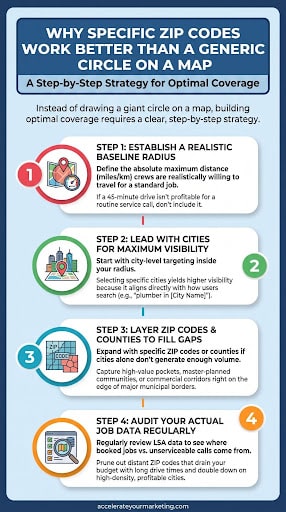
Step 1: Establish a realistic baseline radius
Start by defining the absolute maximum distance (in miles or kilometers, depending on the country you’re in) your crews are realistically willing to travel for a standard job. This acts as your outer guardrail.
If a 45-minute drive isn’t profitable for a routine service call, don’t include that distance in your base setup.
Step 2: Lead with Cities for maximum visibility
When defining your specific coverage inside that radius, start with city-level targeting.
Field testing consistently shows that selecting specific cities yields higher ad visibility compared to relying strictly on counties or ZIP codes. Google’s system aligns city boundaries directly with how users type search queries (e.g., “plumber in [City Name]”), making city targeting the most efficient way to signal local intent.
Step 3: Layer ZIP codes and counties to fill the gaps
City targeting does the heavy lifting, but it isn’t always enough on its own. If targeting cities alone isn’t generating the impression volume you need, expand by layering in specific ZIP codes or counties. This allows you to capture high-value pockets, master-planned communities, or commercial corridors that might sit right on the edge of major municipal borders.
Step 4: Audit your actual job data regularly
Your service map isn’t something you set once and forget. Regularly review your LSA data to see where your actual booked jobs are coming from versus where unserviceable calls originate.
Prune out distant ZIP codes that drain your budget with long drive times, and double down on the high-density cities that drive your highest profit margins.
The Recovery Guide: What to Do If Visibility Drops After an Edit
If you recently edited your service area and noticed your impressions plummet, don’t panic. Any time you alter geographic parameters, the platform enters a temporary recalibration phase.
To keep your campaign on track:
1. Respect the learning period: While LSA doesn’t display an official “learning mode” badge, changing your service areas forces the algorithm to re-evaluate your Proximity Score across your updated map. Expect temporary impression fluctuations and give the system 7 to 14 days to stabilize before making further adjustments. Edits made too quickly reset this evaluation window.
2. Audit lead sources regularly: Periodically review your LSA performance reports to see precisely where your booked leads originate versus where unqualified calls are coming from.
3. Refine based on actual job data: Cross-reference your lead logs with your actual closed-job locations. Remove ZIPs or cities that produce low conversion rates or long drive times, and double down on the areas driving your highest profit margins.
Frequently Asked Questions
-
What if my verified business address is located outside the main city I want to target?
If your office is located outside your primary market, your proximity score will naturally be lower for searches inside that city. While you can still capture leads by explicitly adding that city to your service settings, Google will give preference to competitors physically located within those borders. Focus on maximizing visibility in your immediate area first before stretching your budget to cover more distant, highly competitive markets.
-
Is it a good idea to expand my service area when business gets slow?
It’s super to widen your map when the phone stops ringing, but it usually backfires. When you stretch your coverage into neighborhoods miles away from your shop, your Proximity Score drops, meaning you pay higher customer acquisition costs for low-intent prospects. Furthermore, If those far-away homeowners decide not to book, your conversion rate will drop,and Google will pull back your ad visibility in your main market as well.
-
Will removing ZIP codes and shrinking my map decrease my overall lead volume?
Narrowing your geographic settings may lower your total leads, but it frequently increases your volume of booked, profitable jobs. Eliminating low-converting or distant areas concentrates your budget where your Proximity Score is highest, reducing wasted ad spend and lowering your true cost per booked job.
Conclusion
Your LSA service area setup is more than just an account setting: it’s a major driver of your actual lead volume and return on ad spend. Ditching generic mile circles in favor of intentional, city-first targeting keeps your Proximity Score strong, helps Google’s automated bidding work for you, and ensures your budget goes toward qualified leads in your immediate backyard.
Fine-tuning your geographic boundaries, tracking proximity shifts, and auditing lead placement data require ongoing analysis. Partnering with our team takes the guesswork out of local ad coverage, giving you an optimized LSA strategy built on clean data, strong proximity signals, and proven ROI.
If you’d like to see where your current setup might be leaving money on the table, connect with us for a free LSA audit.